Modern sales teams rely on more than just a CRM to win customers. They use email platforms, video conferencing, marketing automation tools, CPQ software, customer support systems, AI assistants, e-signature platforms, and collaboration apps. While each tool serves a specific purpose, using them in isolation creates data silos, duplicate work, and slower sales cycles.
Salesforce has become the central hub for customer relationship management because of its ability to integrate with hundreds of enterprise applications. When these systems work together, sales representatives spend less time updating records and more time building relationships, while managers gain complete visibility into the sales pipeline.
In fact, according to Salesforce, sales representatives spend only a fraction of their time actively selling, with administrative work consuming a significant portion of their day. The right integrations eliminate these manual tasks through intelligent automation.
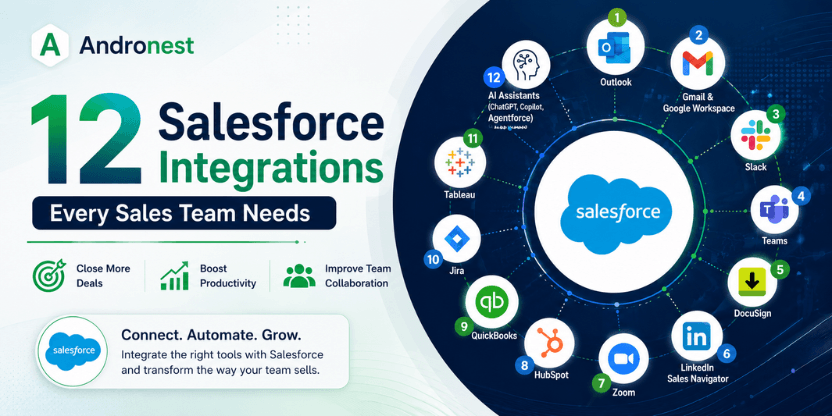
This guide explores the 12 Salesforce integrations every sales team should consider to improve productivity, shorten sales cycles, and deliver a better customer experience.
Your CRM is Only as Powerful as What You Connect to It
Salesforce is the world’s most widely deployed CRM platform. But the version of Salesforce that drives transformational sales outcomes for the teams operating at the top of the market is not Salesforce in isolation. It is Salesforce at the centre of a connected ecosystem — where prospect data flows in automatically, communication is logged without manual effort, documents are executed inside the deal record, conversations are analysed for winning patterns, and finance is reconciled against the CRM without a spreadsheet in sight.
The difference between that version and the default version — a well-configured CRM that still requires reps to manually update records, switch between eight applications during a sales call, and chase approvals across disconnected systems — is measured in time, revenue, and competitive positioning.
Aberdeen Group’s research quantifies it precisely: integrated CRM systems boost sales productivity by 44% and improve forecast accuracy by 42%. Organizations implementing comprehensive Salesforce integration strategies achieve an average revenue increase of 20% and 50% ROI improvement within their first year. Integrated systems save sales representatives an average of five hours per week — which for a team of 25 translates to more than 6,500 hours annually, equivalent to three full-time positions.
With more than 5,500 integrations available through the Salesforce AppExchange and hundreds more through API connectivity, the challenge in 2026 is not finding integrations. It is identifying the twelve that your sales team actually needs — the ones that address the highest-friction points in your pipeline, eliminate the most manual work, and produce the most measurable impact on the activities that drive revenue.
Looking to integrate Salesforce with your existing business applications? Explore our Salesforce Integration Services to build a connected, automated, and future-ready CRM ecosystem.
What Makes a Salesforce Integration Worth Deploying?
Not all integrations are equal. Some connect two systems without meaningfully changing how work gets done. Others fundamentally change the information available to a sales rep in a given moment — and therefore change the quality of the decision they make.
Before evaluating specific integrations, the criteria that determine whether any integration is worth the deployment investment are:
Bidirectional data sync — the integration should move data in both directions, not just push data from a third-party tool into Salesforce. An integration that creates Salesforce records from external events is useful. An integration that also enables Salesforce data to trigger actions in the connected tool is transformative.
Automatic activity logging — the most persistent Salesforce data quality problem is incomplete activity history: calls not logged, emails not tracked, meetings not recorded. The best integrations remove the human logging requirement entirely, ensuring complete CRM data without depending on rep compliance.
Context delivery at the point of action — the highest-value integrations deliver relevant Salesforce data to the rep at the moment they need it — in their inbox, in their call interface, in their document tool — rather than requiring a tab switch to retrieve it.
Measurable productivity impact — integrations worth deploying have documented productivity outcomes: time saved per rep, error rates reduced, cycle time shortened. Ask every integration vendor for outcome data from comparable organizations before committing to the implementation effort.
With those criteria in mind, the following twelve integrations consistently deliver the highest impact for sales teams running Salesforce.
1. Microsoft Outlook Integration
Why It Matters
Sales professionals spend most of their day inside Outlook.
Instead of switching between Outlook and Salesforce, integration automatically syncs:
- Emails
- Meetings
- Contacts
- Calendar events
Benefits
- Automatic activity logging
- Improved contact management
- Calendar synchronization
- Faster follow-ups
Ideal for:
Enterprise sales teams using Microsoft 365.
2. Gmail & Google Workspace
Google Workspace remains one of the most widely used productivity suites.
Salesforce integration enables users to:
- Log Gmail conversations
- Sync Google Calendar
- Create Salesforce records directly from Gmail
- Track email engagement
Benefits include:
- Less manual entry
- Better visibility
- Improved productivity
3. Slack
Slack has become the collaboration platform of choice for many organizations.
Salesforce + Slack enables teams to:
- Receive opportunity alerts
- Share CRM records
- Collaborate on deals
- Approve requests
- Notify executives instantly
Why it matters:
Sales decisions happen faster.
4. Microsoft Teams
Organizations using Microsoft Teams can connect Salesforce to:
- Share customer records
- Schedule meetings
- Start calls
- Collaborate during deal reviews
Benefits
- Centralized communication
- Better cross-functional collaboration
- Faster customer responses
5. DocuSign
Nothing slows a sales cycle more than waiting for signatures.
Salesforce + DocuSign allows teams to:
- Generate contracts
- Send agreements
- Track signatures
- Store signed documents automatically
Business impact
- Faster deal closure
- Reduced paperwork
- Better compliance
6. LinkedIn Sales Navigator
One of the most valuable integrations for B2B sales.
Sales reps can:
- View LinkedIn profiles
- Identify decision-makers
- Receive buying signals
- Save leads directly to Salesforce
Benefits
- Better prospecting
- Personalized outreach
- Higher conversion rates
7. Zoom
Virtual meetings are now part of every sales cycle.
Salesforce integration helps teams:
- Schedule meetings
- Store recordings
- Track attendance
- Link meetings with opportunities
Benefits
- Complete customer history
- Better meeting insights
- Improved follow-ups
8. HubSpot
Many organizations use HubSpot for marketing while Salesforce manages sales.
Integration synchronizes:
- Leads
- Campaigns
- Contacts
- Lifecycle stages
Benefits
- Better lead nurturing
- Sales and marketing alignment
- Accurate attribution
9. Jira
Sales and implementation teams often need engineering support.
Salesforce + Jira enables:
- Issue creation
- Feature requests
- Development tracking
Benefits
- Faster communication
- Better customer visibility
- Reduced delays
10. QuickBooks
Finance teams benefit greatly from this integration.
Automatically sync:
- Customers
- Invoices
- Payments
- Quotes
Benefits
- Faster invoicing
- Better cash flow visibility
- Accurate financial reporting
11. Tableau
Sales leaders need more than standard dashboards.
Salesforce + Tableau enables:
- Executive dashboards
- Revenue forecasting
- Pipeline analytics
- Territory analysis
Benefits
- Better strategic decisions
- AI-powered insights
- Improved forecasting
12. AI Assistants (ChatGPT, Microsoft Copilot, Agentforce)
Perhaps the most transformative integration in 2026.
Modern AI assistants help sales teams:
- Draft emails
- Summarize meetings
- Generate proposals
- Predict customer intent
- Recommend next-best actions
- Analyze opportunities
Benefits
- Increased productivity
- Personalized communication
- Faster response times
- Better decision-making
As AI continues to reshape enterprise sales, integrating Salesforce with intelligent assistants enables teams to automate routine tasks while focusing on building stronger customer relationships.
Read: How Private AI Reduces Long-Term Operational Costs
How to Prioritise Which Integrations to Deploy First
With twelve valuable integrations identified, deployment should be sequenced by impact and implementation effort. Not all twelve integrations are appropriate for every sales team, and attempting to deploy all twelve simultaneously creates implementation risk that no team needs.
A practical prioritization framework considers three dimensions:
Revenue impact: Which integration addresses the highest-friction point in the current deal process? If pipeline is the primary constraint, data enrichment (ZoomInfo/Cognism) and lead routing (Chili Piper) address it most directly. If close rate is the constraint, Gong’s conversation intelligence and PandaDoc’s proposal automation are the highest-impact choices. If forecast accuracy is the issue, Gong, Salesloft, and proper bidirectional sync with marketing are the priority.
Implementation effort: Some integrations deploy in hours (Slack, DocuSign, Chili Piper). Others require significant configuration and testing (MuleSoft enterprise integration, HubSpot bidirectional sync, QuickBooks revenue reconciliation). Sequence lower-effort, high-impact integrations first to build team confidence and demonstrate value before investing in more complex implementations.
Data readiness: Integrations that depend on Salesforce data quality — enrichment tools, routing logic based on account ownership, marketing attribution — require clean, complete Salesforce records to function well. If Salesforce data quality is poor, the data enrichment integration (ZoomInfo/Cognism) should be among the first deployed, creating the foundation for everything else.
Best Practices for Salesforce Integrations
Before integrating Salesforce with any platform:
- Define business objectives
- Prioritize high-impact workflows
- Clean CRM data
- Use secure APIs
- Automate repetitive processes
- Monitor integration performance
- Train sales teams
- Review integrations regularly
Common Integration Challenges
Businesses often face:
- Duplicate records
- API limitations
- Security concerns
- Poor data quality
- User adoption issues
Working with experienced Salesforce consultants helps avoid these challenges while ensuring integrations align with business goals.
Future of Salesforce Integrations
Salesforce integrations are evolving beyond simple data synchronization.
Organizations are increasingly adopting:
- AI-powered workflow automation
- Predictive sales intelligence
- Intelligent CRM recommendations
- Voice-enabled CRM interactions
- Autonomous AI agents
- Real-time customer data platforms
- Hyperautomation
The future belongs to connected ecosystems where CRM, AI, analytics, collaboration, and automation platforms work together seamlessly.
How Andronest Can Help
Implementing Salesforce integrations requires more than connecting applications. Organizations need a strategy that ensures data accuracy, security, scalability, and long-term performance.
At Andronest, we help businesses design and implement intelligent Salesforce integration solutions that connect CRM, AI, automation platforms, cloud applications, and enterprise systems. Whether you’re modernizing your sales processes or building AI-driven workflows, our experts help create a connected ecosystem that accelerates growth and improves customer experiences.
Also read: How to Choose the Right AI Workflow Automation Platform for Your Business
Conclusion
Salesforce is most powerful when it serves as the central hub of your technology ecosystem. By integrating it with communication platforms, marketing tools, finance applications, analytics solutions, collaboration software, and AI assistants, sales teams can eliminate manual work, gain deeper customer insights, and close deals faster.
Rather than adopting every available integration, focus on the ones that solve your team’s biggest challenges and support your long-term business objectives. A well-integrated Salesforce environment empowers sales professionals to spend less time on administration and more time delivering value to customers.
Frequently Asked Questions
1. What are Salesforce integrations?
Salesforce integrations connect Salesforce CRM with third-party applications, allowing data, workflows, and business processes to sync automatically.
2. Which Salesforce integration is best for sales teams?
Popular choices include Outlook, Slack, LinkedIn Sales Navigator, DocuSign, Zoom, and AI assistants, depending on your sales process.
3. Can Salesforce integrate with AI tools?
Yes. Salesforce integrates with AI platforms like Agentforce, Microsoft Copilot, and generative AI solutions to automate tasks and provide intelligent recommendations.
4. Do Salesforce integrations improve productivity?
Absolutely. They reduce manual data entry, improve collaboration, automate workflows, and provide real-time insights that help sales teams close deals more efficiently.
5. How do I choose the right Salesforce integrations?
Start by identifying workflow bottlenecks, then prioritize integrations that automate repetitive tasks, improve data accuracy, and enhance collaboration across your sales organization.